SoftSin Studios ComfyUI Nodes

Create with purpose. The SoftSin Composer Suite transforms scattered ideas into organized, intelligent art pipelines.

Download The Nodes v1.0.0

SoftSin Composer Suite for ComfyUI Portable

🧩 SoftSin Composer Suite is a modular system of custom nodes built for ComfyUI Portable, designed to bring structured creativity and precision control to AI art workflows.

The suite introduces an integrated approach to prompt composition, pose management, lighting, and environment setup — each node communicating through shared JSON data for a unified creative pipeline. It’s engineered for creators who want flexibility, accuracy, and speed without sacrificing control or clarity.

  • ✅ Modular node architecture (Prompt, Pose, Lighting, Environment, and more)
  • ✅ JSON-driven data system for seamless cross-node communication
  • ✅ Built to complement SoftSin web tools: Pose, Depth, Post Processing Editors, and Json Creator
  • ✅ Consistent UI design and standardized field layouts for clarity and workflow speed
  • ✅ Designed and tested with ComfyUI Portable builds
  • ✅ Fully customizable .Json files

⚠️ Note: Compatibility with non-portable or custom ComfyUI builds has not yet been verified. The suite is developed and optimized around the ComfyUI Portable environment, and behavior may differ on other distributions.

The SoftSin Composer Suite represents the core of the SoftSin ecosystem — a structured, ethical approach to AI-assisted art that empowers human direction while keeping the creative process transparent and repeatable.

Development updates, node documentation, and upcoming release details will be shared through SoftSin Studios channels.

💬 Join the SoftSin Studios community and stay connected:

👉 DeviantArt — exclusive galleries and renders made with the SoftSin ecosystem.

⚠️ SoftSin Composer Suite for ComfyUI Portable — Install & Use

Install is simple: verify the download, drop one folder into custom_nodes, restart ComfyUI. Everything else is workflow and customization.

1) Verify the release
  1. Locate the signed bundle:
    softsin_composer_bundle.zip
  2. Unzip it into a folder.
  3. Open README.txt inside that folder.
  4. Follow the README steps to verify the signature and version number.
  5. Once the checks pass, continue to install.
2) Install the node suite
  1. From the verified bundle folder, find the directory:
    softsin_composer
  2. Open your ComfyUI Portable directory and go to:
    /ComfyUI/custom_nodes/
  3. Copy the entire softsin_composer folder into
    /ComfyUI/custom_nodes/
  4. Restart ComfyUI Portable.
  5. In the node menu, look for the SoftSin category.
3) Data files (JSON vocabularies)

The Suite ships with its own data folder: softsin_data. It lives inside softsin_composer and is used by all SoftSin nodes.

  • You do not need to move, rename, or create this folder.
  • JSON files inside softsin_data can be edited to add or tweak options.
  • Do not rename categories or add new category names unless you are comfortable editing Python and understanding how the nodes read those keys. In short: edit at your own risk.
4) First run checklist
  • Launch ComfyUI Portable.
  • Confirm the SoftSin category appears in the node list.
  • Add a SoftSin node and open its dropdowns.
  • If dropdowns are empty or broken, check: custom_nodes/softsin_composer/softsin_data/ still exists and hasn’t been renamed.
5) Basic workflow (visual)
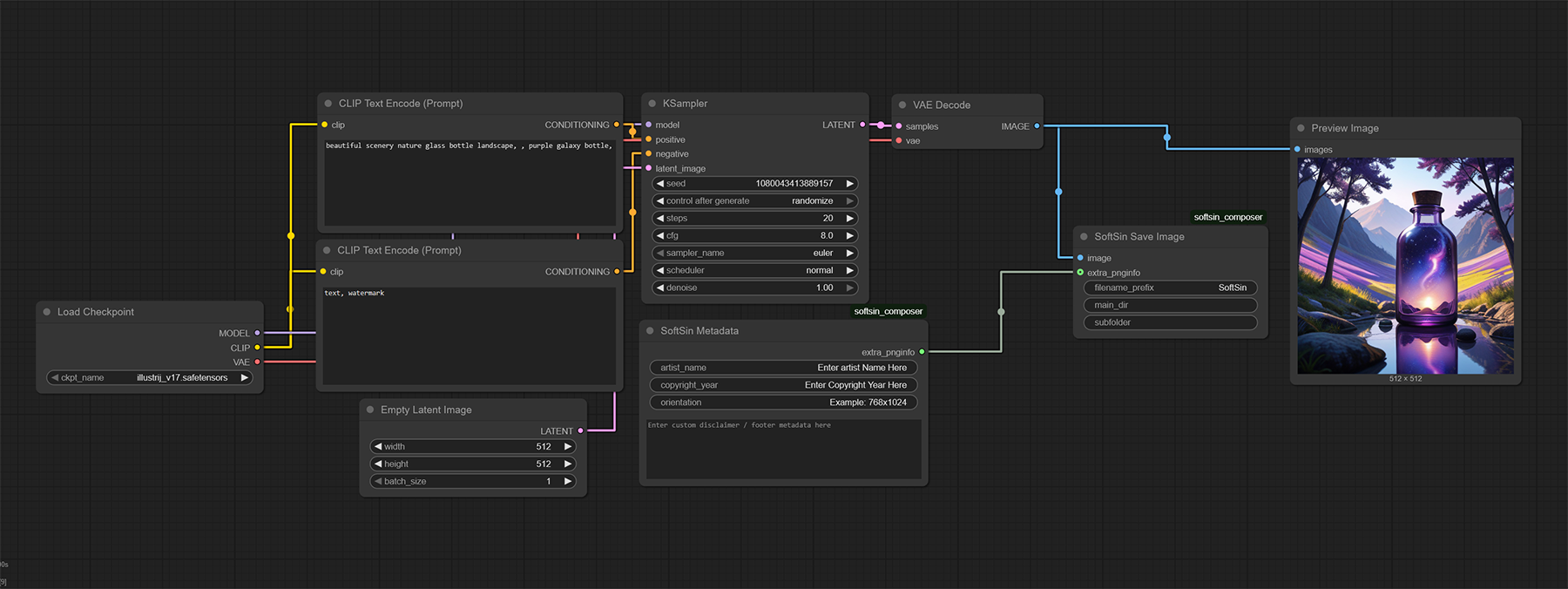
SoftSin Composer basic workflow inside ComfyUI
6) SoftSin nodes - click on node to enlarge
SoftSin Prompt Composer node
Prompt Composer
SoftSin Environmental Attributes node
Environmental Attributes
SoftSin Environments Presets node
Environments Presets
SoftSin Physical Attributes node
Male Physical Attributes
SoftSin Physical Attributes node
Female Physical Attributes
SoftSin Clothing Outfits node
Clothing: male Outfits
SoftSin Clothing Uniforms node
Clothing: male Uniforms
SoftSin Clothing Outfits node
Clothing: Female Outfits
SoftSin Clothing Uniforms node
Clothing: Female Uniforms
SoftSin Clothing Swimsuits node
Clothing: Female Swimsuits
SoftSin Clothing Lingerie node
Clothing: Female Lingerie
SoftSin Poses node
Poses
SoftSin Lighting node
Lighting
SoftSin Image Composition nodeImage Composition
SoftSin Quality nodeImage Quality
SoftSin LoRAs Triggers node
Generic Male Name Triggers
SoftSin LoRAs Triggers node
Generic Female Name Triggers
SoftSin Combine nodeSoft Sin Combine
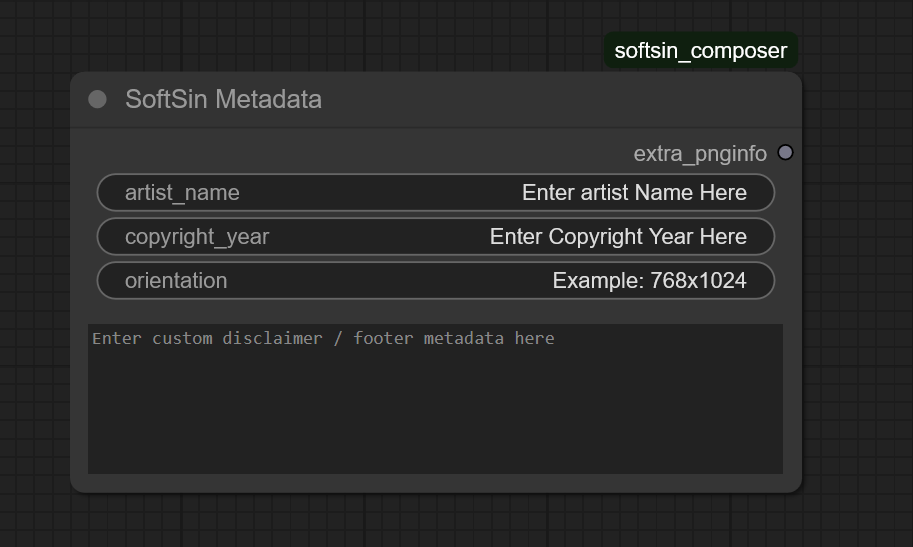
SoftSin Metadata nodeSoftSin Metadata
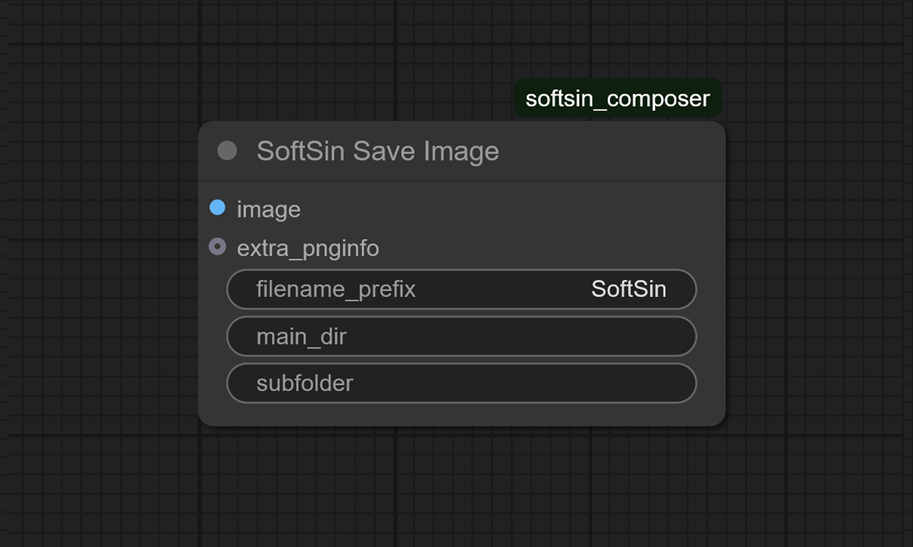
SoftSin Save Image nodeSoftSin Save Image
7) JSON customization (advanced)
SoftSin Composer basic workflow inside ComfyUI
Advanced users can extend the vocabularies by editing JSON inside softsin_data. Changing category names or structures requires Python changes and is not supported for casual users.

Note: The Suite is built and tested on ComfyUI Portable. Other builds may behave differently.

Projects

SoftSin Pose Editor

Create BODY_25 + hands keypoints with depth control. Export JSON/PNG for ControlNet/SDXL.

Open Editor

SoftSin Json creator and editor

Fast, zero-install Json creation and editing tool. Create your json files fast with our intuitive creation and editing process.

Open Editor
SoftSin node preview